
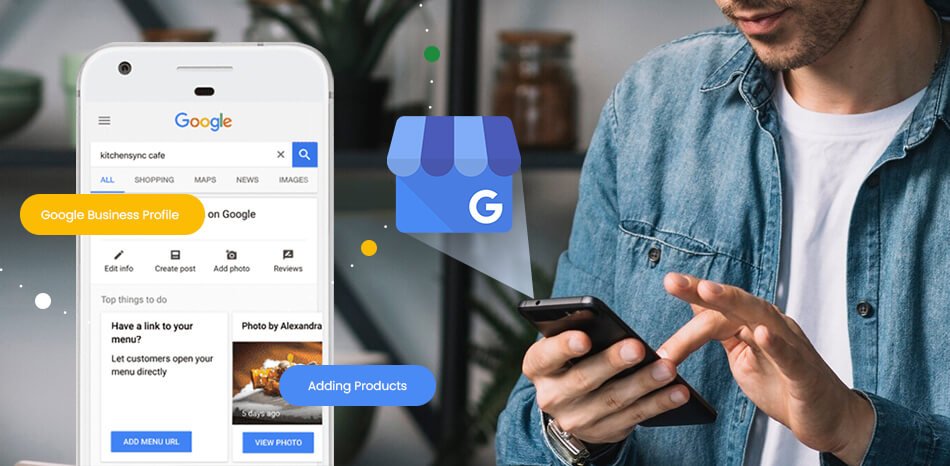
Imagine someone searching Google for “digital marketing agency near me,” “best salon near me,” “restaurant near me,” or even the name of your business.
What do they see?
If your business information appears with your location, phone number, opening hours, reviews, photos and website, a potential customer can quickly understand who you are and how to contact you.
That visibility is powered in large part by your Google Business Profile.
For local businesses, a Google Business Profile is much more than an online listing. It can become an important part of your local SEO and digital marketing strategy, helping customers discover your business on Google Search and Google Maps.
So, what is Google Business Profile, and why does your business need one?
Let’s explore it.
What Is Google Business Profile?
A Google Business Profile is a free Google tool that allows eligible businesses to manage how their business information appears across Google Search and Google Maps.
Your profile can include important information such as:
- Business name
- Business category
- Address or service area
- Phone number
- Website
- Business hours
- Products or services
- Photos and videos
- Customer reviews
- Other business attributes
For example, imagine someone searches for “digital marketing agency near me.” Google may display relevant local businesses with information that helps the searcher decide which business to explore.
Google uses information from business owners, public sources, users and other sources to build and maintain business information shown across Search and Maps.
A complete and accurate profile therefore gives potential customers useful information at the exact moment they are searching.
Why Does Your Business Need Google Business Profile?
Having a website is important, but your website isn’t always the first place a local customer encounters your business.
Someone may discover you through Google Search or Google Maps before visiting your website.
Here are 9 powerful reasons your business should have a Google Business Profile.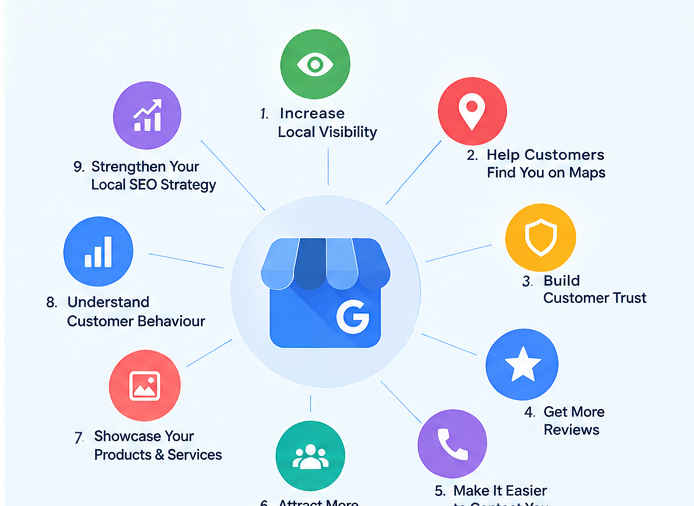
1. Increase Your Local Online Visibility
One of the biggest benefits of a Google Business Profile is increased visibility in local searches.
When customers search for products or services in a particular area, Google can use business information to surface relevant local results.
For example:
Customer searches: “SEO agency near me”
Your profile can show:
Business name → Category → Reviews → Location → Hours → Website → Contact options
This gives customers a quick way to discover your business.
However, having a profile does not guarantee a top position. Google explains that local ranking is mainly influenced by relevance, distance and prominence.
That means your goal should not simply be to create a profile. Your goal should be to create an accurate, useful and trustworthy business presence.
2. Help Customers Find You on Google Maps
For local businesses, Google Maps can be extremely valuable.
Think about how people search when they need something immediately:
- “coffee shop near me”
- “dentist near me”
- “digital marketing agency near me”
- “car repair shop near me”
- “best salon nearby”
When your business information is properly maintained, customers can discover your business through Google Search and Maps.
Your profile can provide directions, business hours, contact information and other details that help people decide whether to visit or contact you.
Google specifically recommends keeping business information complete and accurate so customers can understand what your business does, where it is and when they can visit.
3. Build Customer Trust
Imagine finding two businesses online.
Business A has:
- No photos
- Missing business hours
- No reviews
- Incomplete information
Business B has:
- Professional photos
- Accurate opening hours
- Detailed services
- Customer reviews
- Updated business information
Which one would you be more comfortable contacting?
Most customers will naturally feel more confident when they can find useful and current information.
Your Google Business Profile works like a digital storefront. It can give potential customers their first impression of your business before they visit your website or physical location.
Google also recommends responding to reviews because it shows customers that you value their feedback.
4. Generate More Customer Reviews
Reviews can influence how potential customers perceive your business.
A customer searching for a local service may compare several businesses before making a decision.
Your profile gives customers a place to see ratings and reviews and, where eligible, leave their own feedback.
But remember: don’t buy fake reviews or manipulate ratings.
Instead, encourage genuine customers to share honest experiences.
When customers leave reviews, respond professionally—whether the review is positive or negative.
A thoughtful response can show potential customers that your business listens and cares about customer experience.
5. Make It Easier for Customers to Contact You
A customer shouldn’t have to search through several pages just to find your phone number.
A well-maintained business profile can make important actions easier.
Depending on your business and available features, customers may be able to:
- Call your business
- Visit your website
- Request directions
- Send a message
- Make a booking
- View business information
This can reduce friction between “I found this business” and “I want to contact this business.”
Google’s Business Profile performance reporting can also show interactions such as calls, website clicks, directions and other actions.
6. Attract More Local Customers
Local customers are often searching with strong intent.
Someone searching for “bakery near me” isn’t necessarily looking for information about baking. They may be looking for a bakery they can visit right now.
The same applies to service businesses.
A person searching for:
“SEO agency in [city]”
may already be looking for an agency to hire.
This is why local search visibility can be valuable for businesses that depend on customers from a specific geographic area.
Your Google Business Profile can help connect your business with people searching for relevant products and services in your area.
7. Showcase Your Products, Services, Photos and Updates
Your profile isn’t just about your address and phone number.
You can use available Business Profile features to provide customers with useful information about what your business offers.
For example, you can add relevant:
- Services
- Products
- Photos
- Videos
- Business information
- Updates
High-quality visual content can help potential customers understand your business before they contact you.
Google recommends adding photos and videos to help customers understand what you offer and learn more about your business.
The key is quality and relevance, not uploading random content simply to appear active.
8. Understand How Customers Discover Your Business
One of the most useful parts of a verified Google Business Profile is performance data.
Google provides performance information that can help business owners understand how customers interact with their profile.
Depending on the business and available metrics, you may be able to see information related to:
- Searches
- Profile views
- Calls
- Website clicks
- Direction requests
- Messages
- Bookings
This information can help you understand customer behavior and identify opportunities to improve your local marketing strategy.
For example, if many people discover your business but very few visit your website, you might review your website link, offer, landing page or call-to-action.
9. Strengthen Your Local SEO Strategy
Google Business Profile and local SEO work closely together, but they are not exactly the same thing.
Your Business Profile is one part of a broader local visibility strategy.
Your overall strategy can include:
- Google Business Profile optimization
- Local keyword research
- Website SEO
- Location pages
- Relevant local content
- Customer reviews
- Consistent business information
- Local citations
- Relevant backlinks
- Helpful website content
Google states that local ranking is based mainly on relevance, distance and prominence. Prominence can be influenced by factors such as reviews and links from other websites.
This means your Business Profile should work together with your website and wider local SEO strategy.
How to Optimize Your Google Business Profile
Creating your profile is only the beginning.
To get the most value from your Google Business Profile, focus on accuracy, relevance and customer experience.
1. Complete Your Business Information
Make sure your business name, address or service area, phone number, website and hours are accurate.
Incorrect information can confuse customers and may reduce the usefulness of your listing.
2. Choose the Right Business Category
Select the category that best represents your core business.
Google recommends using the fewest and most specific categories needed to describe the business accurately.
Don’t add unrelated categories just because you think they might help you rank.
3. Add Relevant Services
Clearly explain the services your business actually provides.
This helps potential customers understand what you offer and helps Google understand the relevance of your business.
4. Upload High-Quality Photos
Use clear, genuine images that represent your business.
Depending on your business, you could include:
- Exterior photos
- Interior photos
- Team photos
- Product photos
- Work samples
- Service-related images
5. Keep Your Hours Updated
Incorrect opening hours can create a frustrating customer experience.
Update your regular hours and special hours when necessary.
6. Encourage Genuine Reviews
Ask real customers to share honest feedback about their experience.
Never create fake reviews or manipulate ratings.
7. Respond to Reviews
Reply professionally to positive and negative reviews.
Your responses can demonstrate that customer feedback matters to your business.
8. Follow Google’s Guidelines
Don’t add unnecessary keywords to your business name or create duplicate profiles simply to manipulate rankings.
Google’s guidelines require businesses to represent themselves accurately and consistently and prohibit practices that can lead to profile restrictions or removal.
Common Google Business Profile Mistakes to Avoid
A profile can exist and still be poorly optimized.
Here are some common mistakes to avoid:
Keyword Stuffing
Don’t turn your business name into a list of keywords.
Use your actual real-world business name. Google specifically says unnecessary information in the business name isn’t permitted.
Inaccurate Information
Don’t leave old phone numbers, addresses or opening hours on your profile.
Fake Reviews
Don’t purchase or create fake customer reviews.
Duplicate Profiles
Don’t create multiple profiles for the same location simply to gain additional visibility. Google says there should generally be only one profile per business location.
Ignoring Negative Reviews
A negative review doesn’t automatically mean you should ignore it.
Respond professionally, understand the issue and show future customers that you take feedback seriously.
Google Business Profile vs. Website: Do You Need Both?
Yes.
Your Business Profile and website perform different roles.
Your Google Business Profile can help customers discover your business through local search and Google Maps.
Your website gives you much more space to explain your brand, services, expertise, case studies, content and offers.
Think of them as two parts of the same customer journey:
Google Search → Business Profile → Website → Contact → Customer
For a strong digital marketing strategy, your website and Business Profile should provide consistent and useful information.
Frequently Asked Questions
Is Google Business Profile free?
Yes. Google provides Business Profile as a free tool for eligible businesses.
Does Google Business Profile guarantee a #1 ranking?
No.
Having a profile does not guarantee that your business will appear first. Google says local rankings are primarily based on relevance, distance and prominence.
Does Google Business Profile help local SEO?
It can be an important part of a local SEO strategy because it helps businesses manage information that can appear in Google Search and Maps.
However, local SEO involves more than just your Business Profile.
How often should I update my Business Profile?
Update it whenever your business information changes. You should also keep your photos, services and other customer-facing information useful and current.
Can a service-area business have a Business Profile?
Yes. Eligible service-area businesses can have a Business Profile, and Google has specific guidelines for how service areas should be represented.
Final Thoughts
Your customers are already using Google to discover businesses.
The real question is:
Will they find accurate and useful information about your business when they search?
A well-managed Google Business Profile can help you improve local visibility, build customer trust, provide important business information, collect genuine reviews and make it easier for customers to contact you.
But don’t think of your profile as a one-time setup.
Treat it as an important part of your overall local SEO and digital marketing strategy.
Keep your information accurate. Add useful photos. Maintain your services. Encourage genuine reviews. Respond to customers. Connect your profile with a strong website.
Because when customers search for your business, being visible is only the first step.
Being useful, trustworthy and easy to contact is what can turn a search into a customer.
Ready to Improve Your Online Visibility?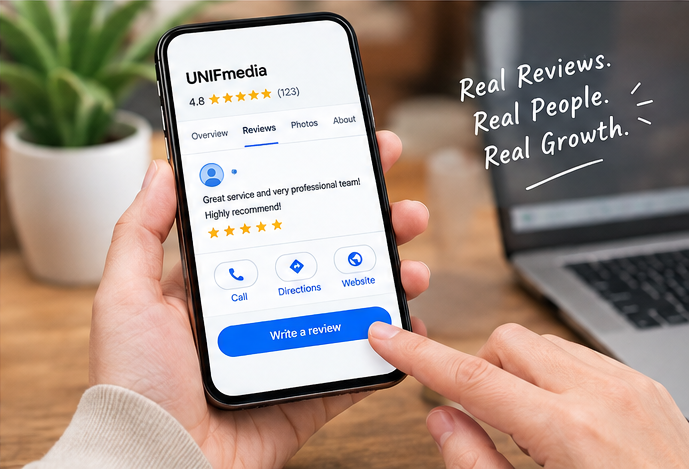
At UNIFmedia, we help businesses build stronger digital visibility through services such as SEO, Local SEO, Google Business Profile management, social media management, website design and digital marketing.
If your business needs help improving its online presence, a well-planned local SEO strategy can be a strong place to start.