
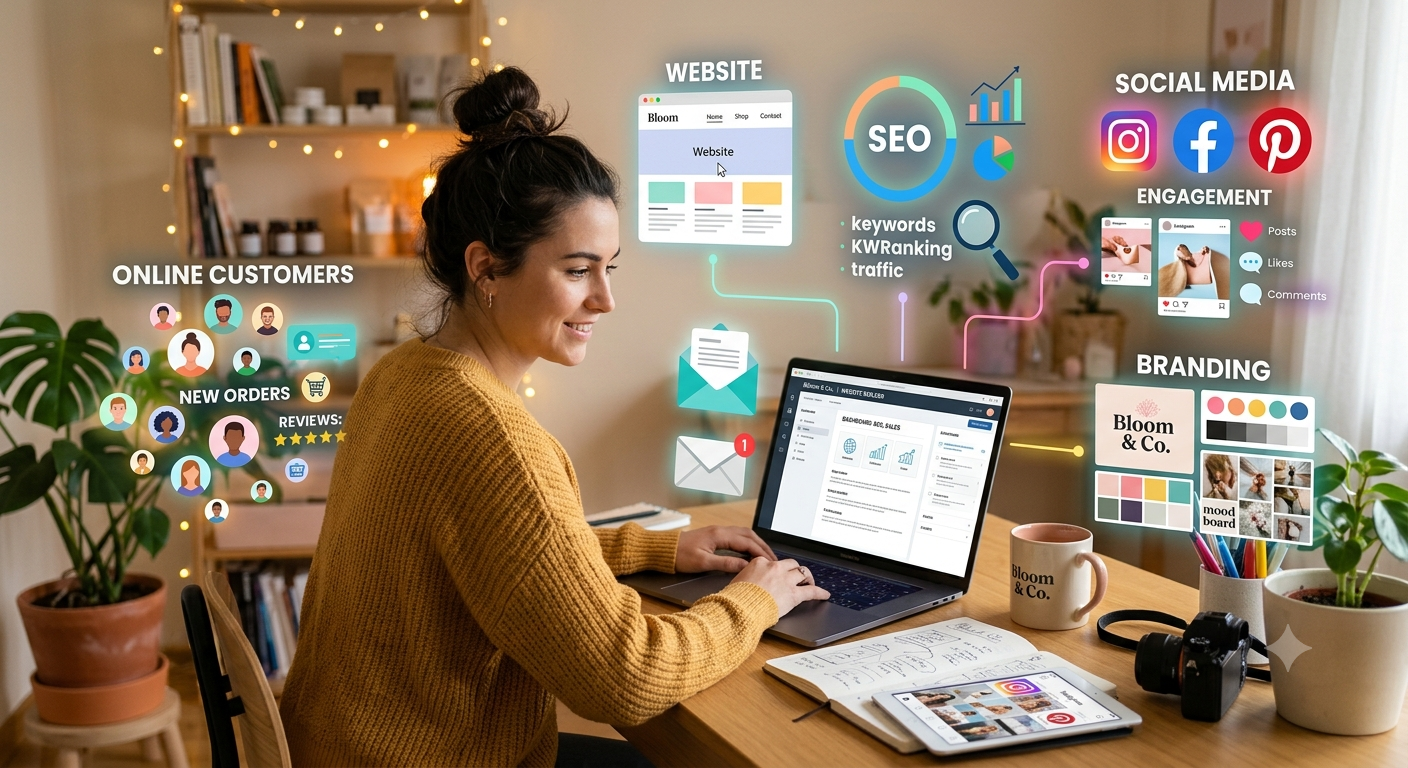
Want to know how to start a business online but don’t know where to begin? Starting an online business can seem complicated when you have to think about branding, websites, social media, SEO, marketing and customers all at once.
The good news is that you don’t have to build everything overnight.
If you want to start a business online, the best approach is to build your online presence step by step. Start with a useful business idea, understand your audience, create a strong brand, build a professional website and then use digital marketing to reach potential customers.
This guide explains how to start a business online from the beginning and how to turn your idea into a professional digital presence.
What Does It Mean to Start a Business Online?
To start a business online means using the internet as an important part of how your business operates, reaches customers, promotes products or services, generates leads or makes sales.
An online business can be completely digital or it can be a traditional local business that uses the internet to attract customers.
For example, you could start:
- An e-commerce store
- A digital marketing agency

- A freelance business
- An online consulting service
- An online education business
- A graphic design business
- A local service business
- A personal brand
- A content-based business
- An online coaching business
The right business model depends on your skills, resources, audience and customer demand.
If you’re searching for how to start an online business, don’t begin with the website or social media account. Begin by understanding the business you want to build.
How to Start a Business Online: 12 Steps
Step 1: Choose the Right Business Idea
The first step in learning how to start a business online is choosing a business idea that solves a real problem.
A good online business should give people a reason to choose your product or service.
Before you start an online business, ask:
- What problem am I solving?
- Who has this problem?
- What product or service can I offer?
- Why would customers choose me?
- What alternatives already exist?
- What can I do differently or better?
For example, instead of saying:
“I want to start a digital marketing business.”
You could define your idea as:
“I help small businesses improve their online presence through website design, SEO, social media and digital marketing.”
The second idea makes the target customer and value proposition much clearer.
When considering how to start a business online, always begin with the customer problem rather than the technology.
Step 2: Research Your Target Audience
Understanding your target audience is one of the most important parts of starting an online business.
You cannot effectively sell to everyone.
You need to know who is most likely to need your product or service.
Research:
- Age
- Location
- Profession
- Income or spending ability
- Interests
- Problems
- Buying behaviour
- Online platforms
- Search behaviour
For example, if you want to start a business online selling professional website design, your audience might include small businesses, entrepreneurs, startups and local service providers.
The more clearly you understand your audience, the easier it becomes to create your website, content and marketing strategy.
Ask Your Potential Customers Questions
Before investing heavily in your business, speak with potential customers.
Ask:
- What problem are you currently facing?
- How are you solving it today?
- What do you dislike about existing solutions?
- What would make your life easier?
- What would make you choose a new provider?
This research can help you understand whether your idea has genuine potential.
Step 3: Validate Your Business Idea
One of the biggest mistakes beginners make when learning how to start an online business is spending too much money before testing the idea.
You don’t necessarily need a large website, expensive branding package or major advertising campaign immediately.
Start small.
You can validate an idea by:
- Speaking with potential customers
- Creating a simple landing page
- Offering a small version of your service
- Sharing your idea with relevant communities
- Testing content around the problem
- Taking early enquiries
- Studying competitors and customer reviews
The purpose of validation is to learn.
If people repeatedly show interest in your solution, you have useful evidence to build on.
Step 4: Choose Your Business Name
Once you have a business idea, choose a name that can represent your business online.
A good business name should be:
- Easy to remember
- Easy to spell
- Easy to pronounce
- Relevant to your brand
- Flexible enough for future growth
Before finalizing the name, check whether the relevant domain name and social media usernames are available.
Also check for existing businesses using the same or confusingly similar name.
Your business name will appear across your website, social media, marketing materials and potentially your products, so choose carefully.
Step 5: Create a Professional Brand Identity
When people search for how to start a business online, they often focus heavily on the technical side.
But your brand matters too.
A professional brand identity can include:
- Logo
- Brand colours
- Fonts
- Brand voice
- Photography style
- Graphic style
- Tagline
- Brand guidelines
Your logo is only one part of your brand.
For example, if your website uses one colour palette but your social media uses completely different colours and messaging, customers may find the brand less recognizable.
A consistent visual identity helps create a more professional experience across your online channels.
Step 6: Register Your Domain and Build a Website
If you want to start a business online, your website can become the central point of your digital presence.
Choose a domain that is:
- Easy to remember
- Relevant to your business
- Easy to type
- Consistent with your brand
Your website should not simply look attractive.
It should help visitors understand your business and take the next step.
Important Website Pages
A basic business website can include:
Home Page
Explain:
- What you do
- Who you help
- What you offer
- Why customers should consider you
- What visitors should do next
About Page
Tell visitors about your business, experience, values and story.
Services or Products Page
Explain your products or services clearly.
Focus on customer benefits instead of using only technical descriptions.
Portfolio or Case Studies
Show examples of your work where relevant.
Contact Page
Make it easy for visitors to contact you.
Strong Calls to Action
Use relevant CTAs such as:
- Get a Quote
- Contact Us
- Book a Consultation
- Get Started
- Shop Now
- Request a Demo
A website should have a clear purpose.
Step 7: Create Your Google Business Profile
If you’re operating a local business or serving customers in a particular service area, a Google Business Profile can be an important part of your online presence.
When you start a business online, make sure your business information is accurate and consistent.
Depending on your business, your profile can include:
- Business name
- Business category
- Address or service area
- Phone number
- Website
- Opening hours
- Photos
- Services
- Customer reviews
Keep your information updated.
For local businesses, your Google presence can help potential customers find important information about your business when searching for relevant products and services.
Step 8: Choose the Right Social Media Platforms
Social media can help a new business reach potential customers, build awareness and communicate with its audience.
But you don’t need to be everywhere.
When you’re learning how to start a business online, choose platforms based on your audience rather than simply choosing the most popular platform.
Potential platforms include:
- YouTube
- Industry-specific platforms
For example, a B2B business may find LinkedIn useful, while a highly visual business may benefit from Instagram, Pinterest or YouTube.
Start with one or two platforms and build consistency.
Your social profile should clearly communicate:
- What your business does
- Who you serve
- What you offer
- Where you operate, if relevant
- How customers can contact you
- Where customers can learn more
Step 9: Build a Content Marketing Strategy
If you want to start a business online successfully, you need more than promotional posts.
You need useful content.
Content can help potential customers discover your business and understand your expertise.
Create content around the questions and problems your audience cares about.
Educational Content
Create:
- How-to guides
- Tutorials
- Tips
- Checklists
- Industry explanations
- Common mistakes
Promotional Content
Show:
- Products
- Services
- Offers
- New launches
- Packages
Trust-Building Content
Share:
- Customer reviews
- Testimonials
- Case studies
- Project examples
- Behind-the-scenes content
Engaging Content
Use relevant:
- Questions
- Polls
- Stories
- Videos
- Short-form content
The goal isn’t to sell something in every post.
The goal is to build familiarity and trust so customers understand why your business can help them.
Step 10: Start SEO for Your Online Business
SEO is an important part of starting an online business because it can help relevant users discover your website through search engines.
Google recommends creating useful, people-first content and making it easy for search engines to understand your pages.
Start with basic SEO.
Optimize Your Website Pages
Use descriptive:
- Page titles
- H1 headings
- H2 headings
- URLs
- Image ALT text
- Meta descriptions
Create Helpful Blog Content
Write articles that answer questions your potential customers search for.
For example, a digital marketing company could publish:
- How to Start a Business Online
- Why Your Business Needs a Professional Logo
- What Is Google Business Profile?
- Why Does Your Business Need Social Media?
- How Does Local SEO Help Small Businesses?
Improve Website Experience
Your website should be:
- Easy to navigate
- Mobile-friendly
- Readable
- Secure
- Accessible
- Technically sound
SEO is not about repeating one keyword as many times as possible.
Google specifically states that excessive repetition can become keyword stuffing.
Instead, use the main topic naturally and cover related questions comprehensively.
Step 11: Make It Easy for Customers to Contact You
If you are learning how to start a business online, don’t overlook one simple thing: make it easy for people to contact you.
A visitor might be interested in your service but leave if they cannot quickly find a way to reach you.
Depending on your business, you can offer:
- Phone
- Contact form
- Booking system
- Product page
- Consultation form
Place important calls to action throughout your website where they make sense.
Don’t force visitors to search through several pages to find your contact information.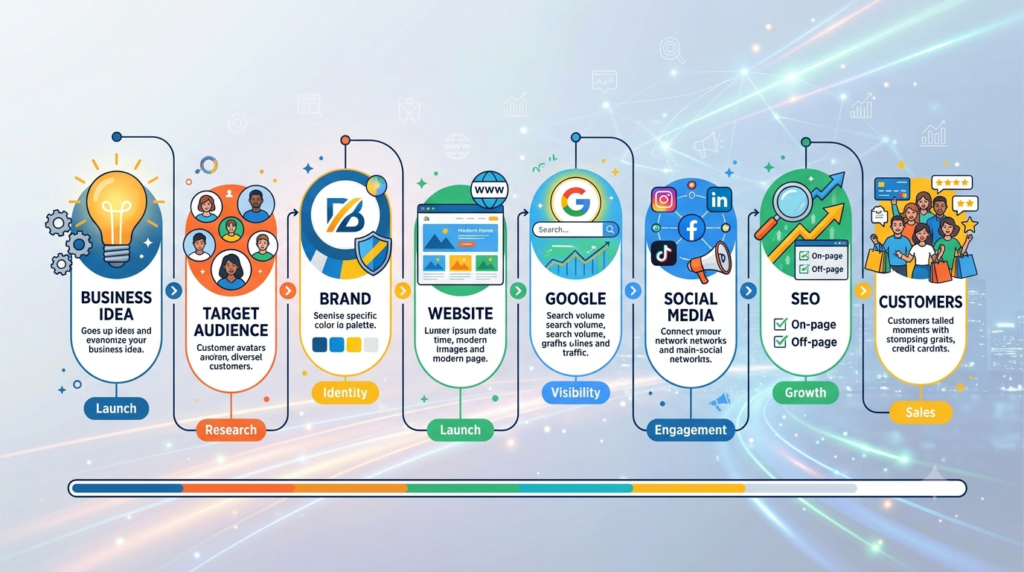
Step 12: Promote Your Business and Measure Results
Once your website and digital presence are ready, start promoting your business.
Depending on your audience and budget, you could use:
- SEO
- Social media marketing
- Content marketing
- Google Business Profile
- Email marketing
- Google Ads
- Social media advertising
- Partnerships
- Referral marketing
If you are starting an online business, don’t immediately spend a large amount on advertising.
First make sure you have:
A clear offer + Target audience + Website + Conversion process + Tracking
Then test your marketing channels and measure the results.
How to Get Your First Customers Online
Knowing how to start a business online is only the beginning.
The next challenge is getting your first customers.
Start with the people closest to your target market.
You can:
- Contact your existing network
- Ask for genuine referrals
- Publish useful content
- Build relationships in relevant communities
- Use social media
- Optimize local search
- Offer an introductory service
- Create useful resources
- Run small advertising tests
Don’t focus only on getting thousands of visitors.
A smaller number of relevant visitors can be more valuable than a large amount of untargeted traffic.
How Much Does It Cost to Start a Business Online?
There is no single cost for starting an online business.
The cost depends on your business model.
A service business may need:
- Domain
- Hosting
- Website
- Branding
- Business software
- Marketing
An e-commerce business may also need:
- Inventory
- Packaging
- Shipping
- Payment processing
- E-commerce software
- Advertising
Start with the essentials.
Avoid purchasing expensive tools simply because another business uses them.
As your business grows, invest more in the areas that contribute to your goals.
Common Mistakes When Starting an Online Business
Trying to Target Everyone
A clearly defined audience usually makes your marketing message stronger.
Building a Website Without a Goal
Your website should guide visitors toward a useful action.
Creating Too Many Social Media Accounts
It is better to manage a few relevant platforms consistently than to create accounts everywhere and rarely update them.
Posting Only Promotional Content
Customers also want useful information, answers and solutions.
Ignoring Local SEO
If your business serves a specific location, local search should be part of your strategy.
Spending Too Much on Advertising Too Early
First test your offer and conversion process.
Focusing Only on Followers
Followers and likes don’t automatically become customers.
Track leads, enquiries, sales and other meaningful business outcomes.
Expecting Immediate SEO Results
SEO is an ongoing process. Google notes that changes can take different amounts of time to be reflected in Search, and there is no guaranteed ranking timeline.
A Simple 30-Day Plan to Start a Business Online
If you’re wondering how to start a business online without becoming overwhelmed, use this simple 30-day plan.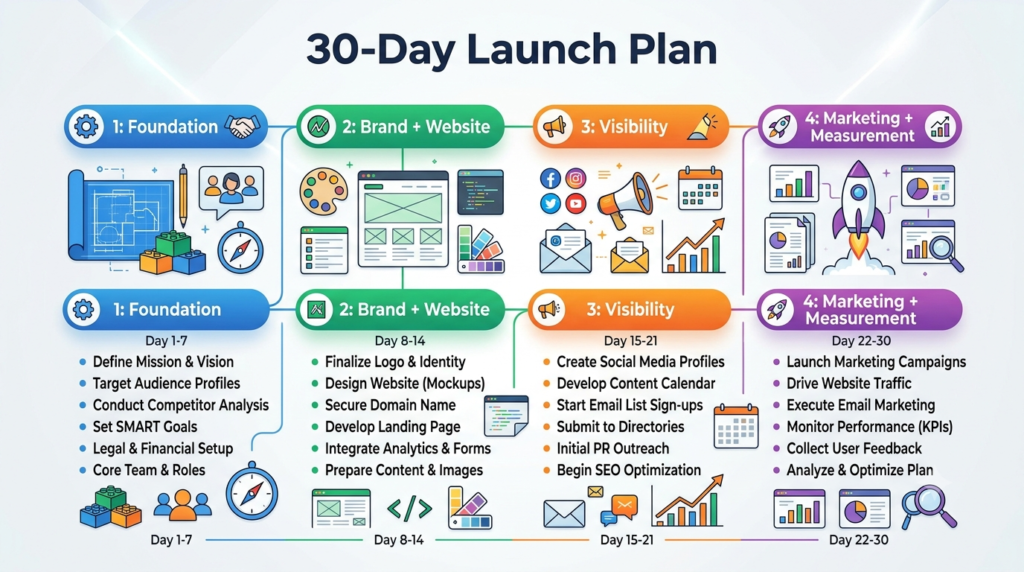
Week 1: Business Foundation
- Choose your business idea
- Define your target audience
- Research competitors
- Identify the problem you solve
- Define your product or service
- Choose your business name
Week 2: Branding and Website
- Create your logo
- Choose your brand colours
- Register your domain
- Set up your website
- Create your Home page
- Create your About page
- Create your Services or Products page
- Add your Contact page
Week 3: Online Visibility
- Create social media profiles
- Set up Google Business Profile if applicable
- Publish useful content
- Start basic SEO
- Add relevant internal links
- Set up Google Search Console
- Check your website on mobile devices
Google Search Console can help website owners understand how their site performs in Google Search.
Week 4: Marketing and Measurement
- Create a content calendar
- Start promoting your business
- Test relevant marketing channels
- Track leads
- Track website traffic
- Monitor enquiries
- Collect genuine customer feedback
- Improve pages based on user behaviour
This approach makes starting an online business more manageable because you’re focusing on one stage at a time.
Frequently Asked Questions About How to Start a Business Online
How do I start a business online?
To start a business online, begin with a clear business idea and target audience. Validate the idea, create your brand, choose a domain, build a professional website, establish relevant social media profiles and Google Business Profile, create useful content and begin marketing your products or services.
How can I start an online business from home?
You can start an online business from home by choosing a business model that can be operated remotely, such as freelancing, consulting, digital marketing, graphic design, online education, content creation or e-commerce. Your exact requirements depend on the type of business you choose.
What is the easiest online business to start?
There is no single easiest online business for everyone. A service business based on an existing skill can be relatively simple to test because you may not need physical inventory. The right option depends on your skills, audience, resources and market demand.
Do I need a website to start a business online?
You can begin some types of online businesses without a website, but a professional website gives your business a central place to explain your products or services, build trust, publish content and generate enquiries.
How do I get customers after starting an online business?
You can attract customers through SEO, social media, content marketing, referrals, local search, partnerships, email marketing and paid advertising. Start with the channels most relevant to your audience and measure which activities generate meaningful enquiries or sales.
How long does it take to start an online business?
The launch time depends on your business model and how much preparation is required. A simple service business may be launched faster than an e-commerce business with inventory, shipping and payment systems. Focus on launching a useful version first and improving it over time.
Is SEO important when starting a business online?
Yes, SEO can help potential customers discover relevant pages through search engines. However, SEO should be combined with a strong offer, useful content, good website experience and other marketing channels.
Final Thoughts: How to Start a Business Online Successfully
Learning how to start a business online doesn’t mean you need to build everything at once.
Start with the foundation.
Choose a useful business idea. Understand your customers. Validate the problem. Create a memorable brand. Build a professional website. Set up the right digital channels. Create useful content. Use SEO and social media to increase visibility. Make it easy for customers to contact you.
Then measure what happens.
If something works, improve it.
If something doesn’t work, learn from it and change your approach.
The goal of starting an online business isn’t simply to have a website or social media account.
The real goal is to build a digital presence that helps the right people:
Discover your business → Understand your offer → Trust your brand → Contact you → Become customers
Ready to Build Your Online Presence?
If you need help with website design, branding, SEO, social media management, Google Business Profile management or digital marketing, UNIFmedia can help you build a stronger digital presence.
From your first website to ongoing digital marketing, the right strategy can help your business create a professional online presence and connect with the customers who matter.
UNIFmedia — Creative ideas. Digital strategy. Real growth.